
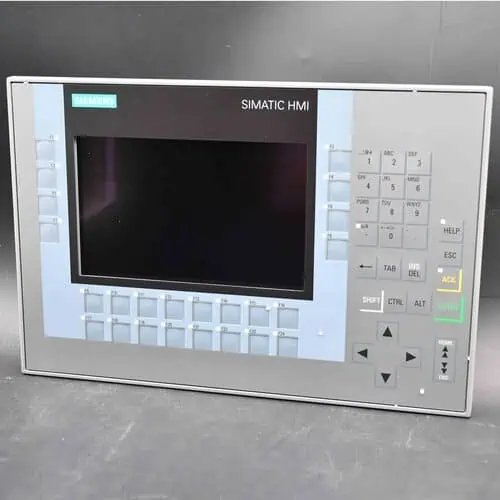
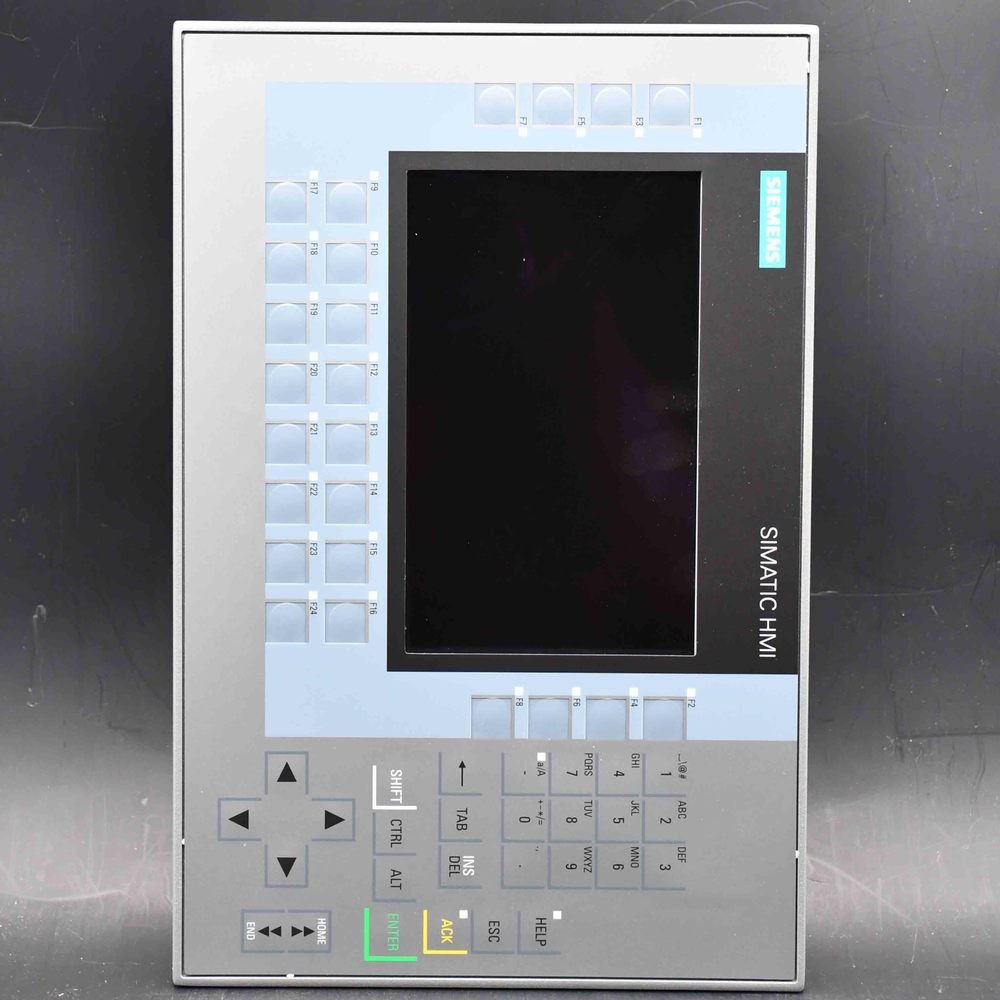
Siemens SIMATIC HMI TP1200 Comfort PRO (6AV2124-0MC24-0AX0) — a 12″ widescreen TFT Comfort Panel PRO for support-arm mounting, fully enclosed IP65, touch operation, 1280×800, 16 million colors, PROFINET plus MPI/PROFIBUS DP interfaces, 24 MB configuration memory, WEC 2013, configurable from WinCC Comfort V14 SP1 + HSP.
| Manufacturer | Siemens (Original Brand) |
|---|---|
| Product Line | SIMATIC HMI TP1200 Comfort PRO — Comfort Panel PRO (12" TFT 1280×800, touch, PROFINET + MPI/PROFIBUS DP, support-arm mount, IP65) |
| Condition | 100% New Original |
| What's Included | Original factory sealed panel (flange on top; support-arm system sold separately) |
| Lead Time | In stock — ships within 48h via DHL, 3–7 days worldwide |
| Availability | Quoted per order (phase-out model, stock varies) |
SIMATIC HMI TP1200 Comfort PRO 12-inch Support Arm Panel PROFINET and PROFIBUS (order number 6AV2124-0MC24-0AX0) is a Siemens Comfort Panel PRO — a 12-inch touch panel built to be mounted on a machine support arm with a top flange, rather than recessed into an enclosure door. It has a 1280 × 800 widescreen TFT, 24 MB of configuration memory, runs WEC 2013, and is engineered with WinCC Comfort V14 SP1 with HSP. Siemens has announced phase-out for this type (PM400, effective 03.02.2026) with the Unified Comfort PRO 6AV2128-3MB27-0AX0 as successor.
| Brand | Siemens |
|---|---|
| Order Number | 6AV2124-0MC24-0AX0 |
| Product | SIMATIC HMI TP1200 Comfort PRO 12-inch Support Arm Panel PROFINET and PROFIBUS |
| Product Family | SIMATIC HMI Comfort Panels PRO |
| Display | 12-inch widescreen TFT, 1280 × 800 pixels (WXGA), 16.7 million colors |
| Operation | Projective-capacitive touch screen on a scratch-resistant glass front (no physical function keys) |
| Mounting | Support arm, flange on top — not expandable (no extension units) |
| Interfaces | 2 × Industrial Ethernet PROFINET (integrated 2-port switch) + 1 × MPI/PROFIBUS DP (RS-422/485) + 2 × USB 2.0 + 2 × SD card slots |
| Power Supply | 24 V DC (permissible range 19.2 – 28.8 V DC); rated current 1.5 A, typical power input 36 W |
| User Memory | 24 MB configuration memory (Windows Embedded Compact 2013, X86) |
| Configuration | WinCC Comfort V14 SP1 with HSP (TIA Portal) |
| Protection | IP65 front and rear (totally enclosed housing) — NEMA 4 / 4X at the front |
| Operating Temp. | 0 °C to +45 °C (vertical mounting; angle-dependent — see data sheet) |
| Net Weight | 6.058 kg |
| Lifecycle | PM400 — product phase-out announced, effective 03.02.2026; successor 6AV2128-3MB27-0AX0 (Unified Comfort PRO) |
| Ships From | Hong Kong — DHL worldwide |
| Availability | On request — confirm per order |
The SIMATIC HMI TP1200 Comfort PRO 12-inch Support Arm Panel PROFINET and PROFIBUS is the 12-inch member of the SIMATIC HMI Comfort Panels PRO family. It is not a variant of the standard TP1200 Comfort (6AV2124-0MC01-0AX0) with a different bezel: the standard panel is designed to be recessed into a cabinet door and fixed with clamps from behind, while this PRO device is designed to hang on a support arm with a flange on top, so the operator station sits where the operator stands instead of where the enclosure happens to be.
Because the unit mounts on a support arm, there is no 310 × 221 mm cut-out to machine into a door and no clamps behind the enclosure plate. That is what makes it the usual choice for machines where the control cabinet is remote, where the operator walks along the line, or where a door-mounted screen would be at the wrong height. The arm and the flange interface are part of the mechanical design, so the arm itself is a separate item — tell us the arm you intend to use and we will confirm the matching flange and adapter.
This order number cannot take expansion units: no bolt-on keypad, no handwheel, no additional operator components. If the application needs those, the same 12-inch PRO panel exists in two expandable variants — 6AV2124-0MC24-0BX0 for a round-pipe support arm and 6AV2124-0MC24-1AX0 for a supporting foot with the flange at the bottom. All three share the display, the electronics and the 24 MB of memory, so the decision is purely mechanical and should be made before the HMI project is drawn.
The PRO devices run Windows Embedded Compact 2013 and carry 24 MB of configuration memory — twice the 12 MB of the standard Comfort panel — and they are engineered with WinCC Comfort V14 SP1 with HSP rather than V11. In practice, a project written for a standard TP1200 Comfort has to be checked against V14 SP1 and the HSP before it is downloaded to a PRO device; it is not a straight swap.
Siemens lists this order number as PM400 — product phase-out announced, effective 3 February 2026, with 6AV2128-3MB27-0AX0 (Unified Comfort PRO) named as the successor. Note that the successor is a Unified panel: migrating to it means moving the project to WinCC Unified, not just changing the hardware. Some distributor listings still show this item as PM300 active — that data is out of date.
| Item | Specification |
|---|---|
| Display | 12-inch widescreen TFT, 1280 × 800 px (WXGA), 16,777,216 colors, dimmable LED backlight (MTBF 80,000 h at 25 °C) |
| Operation | Projective-capacitive touch screen on a glass front; 40 direct keys configurable as S7 input I/O; no physical function keys |
| Mounting | Support arm with top flange; not expandable (no extension units) |
| Interfaces | 2 × Industrial Ethernet PROFINET (2-port switch) + 1 × MPI/PROFIBUS DP (RS-422/485) + 2 × USB 2.0 |
| Storage | 24 MB configuration memory + 2 × SD card slots |
| Supply | 24 V DC (19.2 – 28.8 V DC); rated current 1.5 A, typical power input 36 W |
| Operating system | Windows Embedded Compact 2013 (WEC 2013), X86 platform |
| Protection | IP65 front and rear (totally enclosed); NEMA 4 / 4X at the front |
| Ambient temperature | 0 °C to +45 °C (vertical mounting; angle-dependent) |
| Engineering software | WinCC Comfort V14 SP1 with HSP (TIA Portal) |
| Approvals | CE, cULus, RCM, KC; RoHS compliant |
Values per the Siemens product documentation; confirm the support-arm flange, adapter and supply against the current data sheet before ordering mechanical parts.
| Order number | Mounting | Expandable |
|---|---|---|
| 6AV2124-0MC24-0AX0 (this page) | Support arm, flange on top | No — no extension units |
| 6AV2124-0MC24-0BX0 | Support arm, round pipe | Yes |
| 6AV2124-0MC24-1AX0 | Supporting foot, flange at bottom | Yes |
All three are 12-inch Comfort PRO panels with the same display, interfaces and 24 MB memory. Choose on mounting and expandability only — the HMI project does not have to change between them.
Engineering requires the TIA Portal with WinCC Comfort V14 SP1 and the HSP — a project originally written for a standard Comfort panel on V11 or V13 must be checked and, if necessary, migrated before download. Over PROFINET, MPI or PROFIBUS DP the panel couples to SIMATIC S7-1200, S7-1500 and S7-300/400 controllers; Modbus TCP/IP and EtherNet/IP cover third-party controllers. Because the device hangs on a support arm, plan the arm, flange and cable routing as part of the mechanical design — there is no cabinet cut-out. And because Siemens has announced phase-out (PM400, effective 03.02.2026) with the Unified Comfort PRO 6AV2128-3MB27-0AX0 as successor, confirm availability before locking the design, and expect a WinCC Unified migration if you move to the successor.
What is 6AV2124-0MC24-0AX0?
It is the SIMATIC HMI TP1200 Comfort PRO 12-inch Support Arm Panel PROFINET and PROFIBUS — a 12-inch Comfort Panel PRO with a 1280 × 800 widescreen TFT, projective-capacitive touch operation on a scratch-resistant glass front, PROFINET plus MPI/PROFIBUS DP interfaces, 24 MB configuration memory, Windows Embedded Compact 2013, designed for support-arm mounting with a top flange and engineered with WinCC Comfort V14 SP1 with HSP.
Is this panel the same as the TP1200 Comfort?
No. The standard TP1200 Comfort (6AV2124-0MC01-0AX0) is recessed into an enclosure door and fixed with clamps behind the plate. This PRO device mounts on a support arm with a flange on top, carries 24 MB instead of 12 MB of configuration memory, runs WEC 2013 instead of Windows CE 6.0, and needs WinCC Comfort V14 SP1 with HSP instead of V11.
Is this panel discontinued?
Siemens lists it as PM400 — product phase-out announced, effective 3 February 2026, with 6AV2128-3MB27-0AX0 (Unified Comfort PRO) as the named successor. It can still be sourced while stocks last, but the successor is a Unified panel, so moving to it means migrating the project to WinCC Unified. Some distributor pages still show this item as active; that data is out of date.
What is the difference between 0AX0, 0BX0 and 1AX0?
Mounting and expandability only. 0AX0 is a support arm with the flange on top and is not expandable. 0BX0 is a support arm for a round pipe and is expandable. 1AX0 is a supporting foot with the flange at the bottom and is expandable. Display, interfaces and memory are identical, so the HMI project does not change between them.
Does it need a panel cut-out?
No. It is mounted on a support arm through the top flange, so there is no cut-out in an enclosure door and no mounting clamps behind a plate. The support arm and the flange interface are separate mechanical items — tell us which arm you plan to use and we will confirm the matching flange or adapter.
Can I add a keypad or handwheel to it?
Not to this order number — it is the non-expandable variant. If you need extension units, order 6AV2124-0MC24-0BX0 (round-pipe support arm, expandable) or 6AV2124-0MC24-1AX0 (supporting foot, expandable) instead.
Which software do I need to configure it?
The TIA Portal with WinCC Comfort V14 SP1 and the HSP. It is not configured with WinCC Basic (Basic Panels) or WinCC Unified (Unified Comfort / Unified Comfort PRO panels). A project written for an older Comfort panel version should be checked against V14 SP1 before download.
How much configuration memory does it have?
24 MB, twice the 12 MB of the standard TP1200 Comfort. Two SD card slots are available for archiving, recipes and project storage on top of that.
Is the touch screen capacitive or resistive?
It is a projective-capacitive touch screen behind a non-reflecting glass front. The glass is scratch-resistant and chemical-resistant, and the panel is specified for operation with gloves. Resistive touch is used on the standard Comfort Panels and on the Basic Panels, not on the PRO devices.
Does it have PROFINET and PROFIBUS?
Both. It has two Industrial Ethernet PROFINET ports with an integrated switch and one RS-422/485 interface for MPI/PROFIBUS DP, so the same panel can serve a PROFINET line and a legacy PROFIBUS segment.
What power supply does it need?
24 V DC with a permissible range of 19.2 – 28.8 V DC. The rated current is 1.5 A and the typical power input is 36 W. Size the supply with headroom for the inrush current (I²t 0.5 A²s) and, where Extension Units are fitted, for their additional load.
What is the operating temperature range?
0 °C to +45 °C in vertical mounting; the permissible range depends on the mounting angle, so check the data sheet for your installation position before specifying the enclosure or arm location.
Is it suitable for washdown or outdoor use?
The housing is totally IP65 protected — front and rear — with NEMA 4 / 4X at the front, because these devices are designed for cabinet-free machine mounting. That suits washdown and splash zones on a normal plant floor. For outdoor, UV-exposed, wide-temperature or hazardous-area installation, the Outdoor Comfort variants are the correct choice rather than this device.
Is the panel genuine and new?
We supply genuine Siemens hardware sourced through established channels. Condition (new, new-surplus or refurbished) is stated on every quote, and units are inspected before dispatch.
Is CAN Electric an authorized Siemens distributor?
No — we are an independent channel trader, not Siemens. We source genuine Siemens products through Siemens-authorized distribution partners and confirm condition and delivery on your quote.
How do I get a quote and how is it shipped?
Email sales@can-electric.com with the order number, the support arm you intend to use, the condition you need and the delivery country. We confirm availability and terms per order and quote in USD; shipment is from Hong Kong via DHL worldwide, with packaging and lead time confirmed on each quote.
6AV2123-2DB03-0AX0SIMATIC HMI Basic Panel 2nd Generation (Key and Touch)● On Request
6AV2123-2GA03-0AX0SIMATIC HMI Basic Panel 2nd Generation (Key and Touch)● On Request
6AV2123-2GB03-0AX0SIMATIC HMI Basic Panel 2nd Generation (Key and Touch)● On Request
6AV2123-2JB03-0AX0SIMATIC HMI Basic Panel 2nd Generation (Key and Touch)● On Request
6AV2123-2MA03-0AX0SIMATIC HMI Basic Panel 2nd Generation (Key and Touch)● On Request
6AV2123-2MB03-0AX0SIMATIC HMI Basic Panel 2nd Generation (Key and Touch)● On Request
6AV2123-3DB32-0AW0SIMATIC HMI Unified Basic Panel● On Request
6AV2123-3GB32-0AW0SIMATIC HMI Unified Basic Panel● On Request
6AV2123-3KB32-0AW0SIMATIC HMI Unified Basic Panel● On Request
6AV2123-3MB32-0AW0SIMATIC HMI Unified Basic Panel● On Request
6AV2124-0GC01-0AX0SIMATIC HMI Comfort Panel● On Request
6AV2124-0GC13-0AX0SIMATIC HMI Outdoor Comfort Panel● On Request
6AV2124-0JC01-0AX0SIMATIC HMI Comfort Panel● On Request
6AV2124-0MC01-0AX0SIMATIC HMI Comfort Panel● On Request
6AV2124-0MC24-0BX0SIMATIC HMI Comfort Panel PRO● On Request
6AV2124-0MC24-1AX0SIMATIC HMI Comfort Panel PRO● On Request
6AV2124-0QC02-0AX1SIMATIC HMI Comfort Panel● On Request
6AV2124-0QC02-0AX2SIMATIC HMI Comfort Panel● On Request
6AV2124-0QC13-0AX0SIMATIC HMI Outdoor Comfort Panel● On Request
6ES7511-1AL03-0AB0SIMATIC S7-1500 CPU 1511-1 PN (station, Profinet)● On Request
CAN Electric is an independent channel trader. Genuine Siemens products are sourced through Siemens-authorized partners — we are not Siemens itself, and condition and delivery are confirmed on each quote. Lifecycle statements follow the Siemens product status at the time of writing.
We will contact you within 1 working day, please pay attention to the email with the suffix “allen@can-electric.com”.