
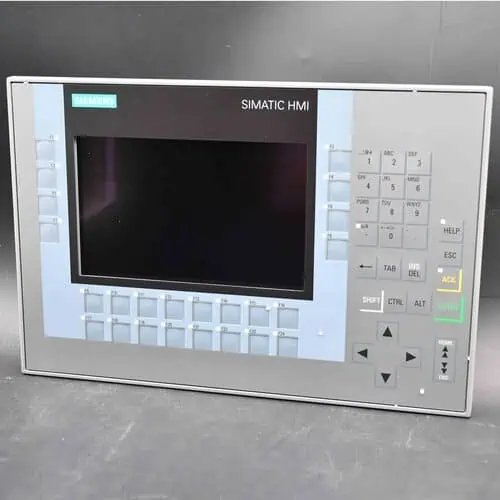
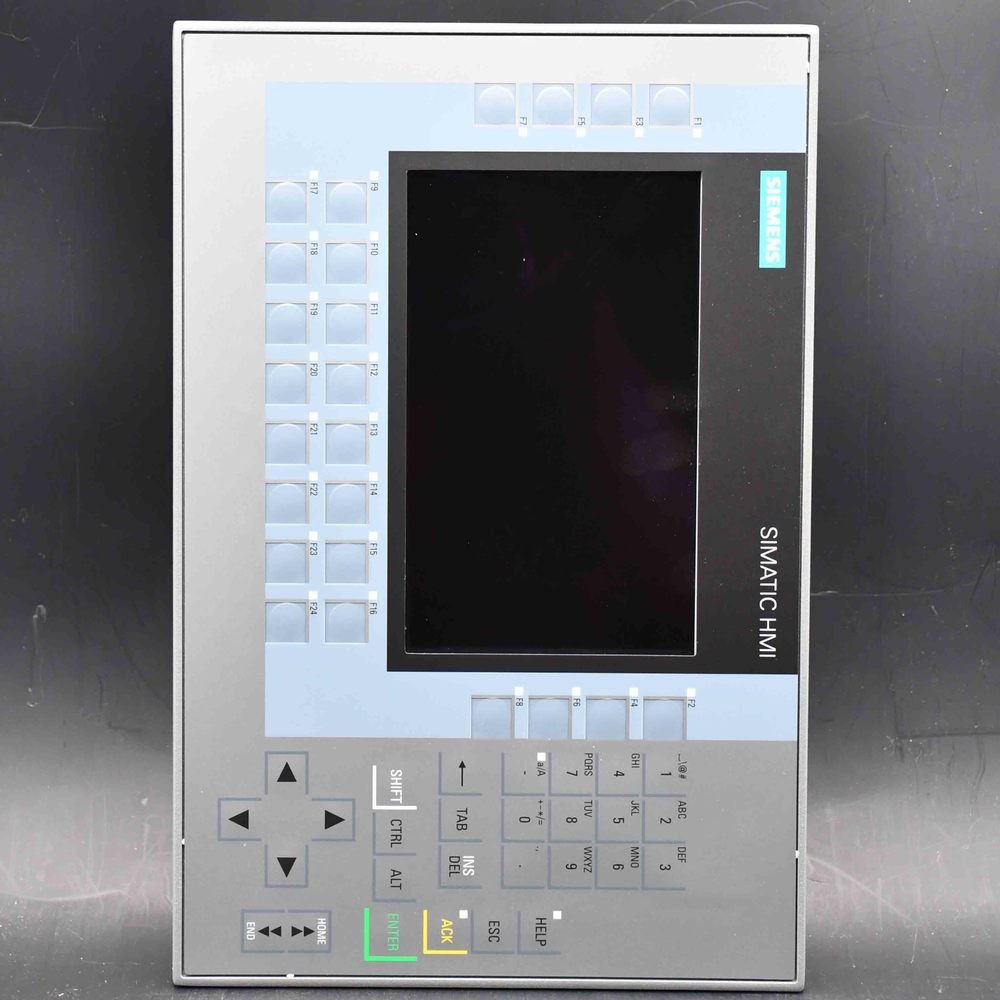
Siemens SIMATIC HMI TP1500 Comfort PRO (6AV2124-0QC24-0BX0) — a 15.6″ widescreen TFT Comfort Panel PRO for round-tube support-arm mounting, expandable, touch operation, 1366×768, 16 million colors, PROFINET plus MPI/PROFIBUS DP interfaces, 24 MB configuration memory, WEC 2013, fully enclosed IP65, configurable from WinCC Comfort V14 SP1 + HSP.
| Manufacturer | Siemens (Original Brand) |
|---|---|
| Product Line | SIMATIC HMI TP1500 Comfort PRO — round-tube support-arm version (15.6" TFT 1366×768, touch, PROFINET + MPI/PROFIBUS DP, expandable, IP65) |
| Condition | Original factory sealed panel (pedestal / supporting foot sold separately) |
| What's Included | Original factory sealed panel |
| Lead Time | In stock — ships within 48h via DHL, 3–7 days worldwide |
| Availability | In stock — quote for qty |
The SIMATIC HMI TP1500 Comfort PRO 0BX0 (order number 6AV2124-0QC24-0BX0) is the expandable 15.6-inch Comfort PRO panel: it mounts on a standard 48 mm round pipe and accepts up to two extension units, so hardware keys can sit beside the screen instead of on it. Only the mechanical interface separates it from the fixed 0AX0 — the display, electronics and engineering project are the same.
| Brand / Family | Siemens — SIMATIC HMI Comfort Panels PRO |
|---|---|
| Order Number | 6AV2124-0QC24-0BX0 |
| Display | 15.6-inch widescreen TFT, 1366 × 768 px, 16.7 million colors |
| Mounting | Support arm, standard 48 mm round pipe — expandable |
| Extension units | Up to 2, for hardware operator elements beside the screen |
| Communication | PROFINET (2-port switch + separate port), MPI/PROFIBUS DP, 2 × USB 2.0, 2 × SD |
| Engineering | WinCC Comfort V14 SP1 with HSP (TIA Portal) — 24 MB memory, WEC 2013 |
| Lifecycle | PM400 phase-out announced; successor MTP1500 Unified Comfort PRO (6AV2128-3QB.7-..X0) |
| Availability | On request — confirmed per order |
Most support-arm panels are touch-only, and for a lot of machines that is fine. It stops being fine when the operator has to hit stop without looking, work in gloves thick enough to defeat a projected-capacitive surface, or repeat a jog or an acknowledge several hundred times a shift. Those are the cases this order number exists for. The screen stays the same; what changes is that the housing can carry extension units, and an extension unit is a bolt-on body beside the display with real keys and switches wired into the panel.
The mounting bore follows the standard 48 mm support-arm system, so a machine that already has an arm from another supplier does not have to be re-engineered around a proprietary bracket — and a panel that fails can be swapped without touching the arm structure. The pipe adapter is not part of the panel’s scope of supply, which is why we ask which arm you intend to use before quoting. The tube, the joint and the cable routing belong to the machine; the panel is the part that hangs on the end.
This family is in phase-out, and the successor runs a different software platform — but the extension-unit interface is mechanically compatible between Comfort PRO and Unified Comfort PRO. Practically: the arm, the extension units and their wiring survive the migration, and only the panel and its project have to be replaced. If you are specifying a machine that will still be built in 2030, that is the difference between replacing one part and rebuilding the operator station.
| Item | Specification |
|---|---|
| Display | 15.6-inch widescreen TFT; 1366 × 768 px; display area 344.2 × 193.5 mm; 16,777,216 colors; LED backlight dimmable 0–100%, MTBF 50,000 h at 25 °C |
| Operation | Projective-capacitive touch on a glass front; 40 direct keys usable as S7 input I/O; no physical function keys on the panel itself — hardware keys come from extension units |
| Mounting / orientation | Support arm, standard 48 mm round pipe; vertical mounting; portrait format not permitted; max tilt 35° without external ventilation |
| Extension units | Up to 2; 12- to 22-inch class housings with hardware operator elements; interface mechanically compatible with Unified Comfort PRO |
| Interfaces | 2 × Industrial Ethernet PROFINET (2-port switch + separate port); 1 × RS-422/485 for MPI/PROFIBUS DP; 2 × USB 2.0; 2 × SD card slots |
| Processor / memory | X86 platform; 24 MB user memory; hardware clock with battery buffer |
| Operating system | Windows Embedded Compact 2013 (WEC 2013) |
| Supply | 24 V DC, permissible 19.2 – 28.8 V DC; rated current 1.5 A; typical power input 36 W; inrush I²t 0.5 A²s |
| Protection | IP65 at the front and at the rear (totally enclosed); NEMA 4 / 4X at the front |
| Ambient temperature | 0 °C to +45 °C vertical; 0 °C to +40 °C at maximum tilt; transport/storage −20 °C to +60 °C; max 90% relative humidity, no condensation |
| Housing | Front 396 × 256 mm; installation depth 101 mm; aluminium front |
| Engineering software | WinCC Comfort V14 SP1 with HSP (TIA Portal) |
| Net weight | 7.275 kg (packaging 30.6 × 46.7 × 19.7 cm) |
| Approvals | CE, cULus, RCM, KC; RoHS compliant |
Data per the Siemens product documentation. Confirm the pipe adapter, the extension-unit selection and the supply against the current data sheet before ordering mechanical parts.
| Question | Answer |
|---|---|
| What is an extension unit? | A separate housing that bolts beside the panel and carries hardware keys and operator elements, wired into the panel through a dedicated interface. |
| How many can be fitted? | Two, one on each side of the display. |
| Which sizes exist? | Housings in the 12- to 22-inch class, so the extension can match the visual height of a larger panel. |
| Does it add screen area? | No. It adds physical controls only — the display stays 15.6 inches. |
| Does it work after the platform migration? | Yes. The interface is mechanically compatible with Unified Comfort PRO, so the extension units carry over. |
If the machine needs no physical controls, the fixed 0AX0 does the same job for less hardware — the extension interface is the only thing you are paying for here.
| Order number | Mounting | Extension units | Choose it when |
|---|---|---|---|
| 6AV2124-0QC24-0AX0 | Support arm, flange on top | No | The arm is already fixed to the machine and touch-only operation is enough. |
| 6AV2124-0QC24-0BX0 — this page | Support arm, 48 mm round pipe | Yes — up to 2 | The arm is a standard pipe, or hardware keys must sit beside the screen. |
| 6AV2124-0QC24-1AX0 | Supporting foot, flange at the bottom | Yes — up to 2 | There is no structure above the operator to hang an arm from. |
All three run the same project, the same engineering software and the same screen layout — the difference is purely how the panel is held up. The smaller 12-inch version of this housing is documented on the TP1200 Comfort PRO (6AV2124-0MC24-0AX0) page.
The panel couples to SIMATIC S7-1200, S7-1500 and S7-300/400 over PROFINET, MPI or PROFIBUS DP; Modbus TCP/IP and EtherNet/IP cover third-party controllers. A door-mounted TP1500 Comfort project does not load onto this device unchanged — the module and the TIA device type differ, so budget the rework before treating it as a drop-in replacement.
A Siemens SIMATIC HMI TP1500 Comfort PRO — the expandable 15.6-inch housing for support-arm mounting on a standard 48 mm round pipe, with a 1366 × 768 projective-capacitive display, 24 MB project memory and WinCC Comfort V14 SP1 engineering.
An interface for up to two extension units, and a 48 mm round-pipe mount instead of a top flange. The panel, its project and its wiring are identical to the fixed version — you are buying the ability to put hardware keys beside the screen, nothing else.
Any standard 48 mm round-pipe system, including arms from suppliers other than Siemens. Tell us the arm you have and we confirm the adapter; the tube and joint themselves are part of the machine, not the panel’s scope of supply.
Two — one on each side. They carry hardware keys and operator elements and are available in 12- to 22-inch housings; they add physical controls, not screen area.
No. Unlike the fixed and pedestal variants, this housing does not ship with a mounting adapter, because the correct one depends on the arm you use. We confirm it with the order.
Yes. The extension-unit interface is mechanically compatible between Comfort PRO and Unified Comfort PRO, so the arm and the extension units carry over when the panel is replaced — the software project is what has to be migrated.
Same display, same electronics, same engineering software. The difference is the mounting interface and the extension-unit port, so a project moves between them without touching the screen layout.
Siemens has announced phase-out for the whole Comfort PRO family (PM400, announcement of 31 January 2026), with the MTP1500 Unified Comfort PRO — the 6AV2128-3QB.7-..X0 series — as successor. Product cancellation is provisionally scheduled for December 2027; until then it remains obtainable as a new part while stocks last.
WinCC Comfort V14 SP1 with the HSP in TIA Portal, on 24 MB of project memory running Windows Embedded Compact 2013. WinCC Basic and WinCC Unified do not apply to this device.
The projective-capacitive glass front is specified for gloved operation, but thick or dirty gloves are exactly the case where an extension unit with real keys is the safer answer. Resistive touch belongs to the standard Comfort and Basic panels.
No — landscape only. Maximum tilt without external ventilation is 35°, and at that angle the ambient limit falls from +45 °C to +40 °C.
The hardware is genuine Siemens, sourced through Siemens-authorized distribution partners; condition is stated on every quote. CAN Electric is an independent channel trader, not Siemens and not a factory-authorized distributor.
Send the order number, quantity, condition, extension-unit requirement and delivery country to sales@can-electric.com. We reply with availability, USD pricing and DHL lead time for that specific order.
6AV2124-0QC24-0AX0SIMATIC HMI Comfort Panel PRO● On Request
6AV2124-0QC24-1AX0SIMATIC HMI Comfort Panel PRO● On Request
6AV2124-0UC02-0AX1SIMATIC HMI Comfort Panel● On Request
6AV2124-0UC24-0AX0SIMATIC HMI Comfort Panel PRO● On Request
6AV2124-0UC24-0BX0SIMATIC HMI Comfort Panel PRO● On Request
6AV2124-0UC24-1AX0SIMATIC HMI Comfort Panel PRO● On Request
6AV2124-0XC02-0AX0SIMATIC HMI Comfort Panel● On Request
6AV2124-0XC02-0AX1SIMATIC HMI Comfort Panel● On Request
6AV2124-0XC24-0AX0SIMATIC HMI Comfort Panel PRO● On Request
6AV2124-0XC24-0BX0SIMATIC HMI Comfort Panel PRO● On Request
6AV2124-0XC24-1AX0SIMATIC HMI Comfort Panel PRO● On Request
6AV2124-1DC01-0AX0SIMATIC HMI Comfort Panel● On Request
6AV2124-1GC01-0AX0SIMATIC HMI Comfort Panel● On Request
6AV2124-1JC01-0AX0SIMATIC HMI Comfort Panel● On Request
6AV2124-1MC01-0AX0SIMATIC HMI Comfort Panel● On Request
6AV2124-1QC02-0AX1SIMATIC HMI Comfort Panel● On Request
6AV2124-2DC01-0AX0SIMATIC HMI Comfort Panel● On Request
6ES7511-1AL03-0AB0SIMATIC S7-1500 CPU 1511-1 PN (station, Profinet)● On Request
CAN Electric is an independent channel trader. Genuine Siemens products are sourced through Siemens-authorized partners — we are not Siemens itself, and condition and delivery are confirmed on each quote. Lifecycle statements follow the Siemens product status at the time of writing.

We will contact you within 1 working day, please pay attention to the email with the suffix “allen@can-electric.com”.