
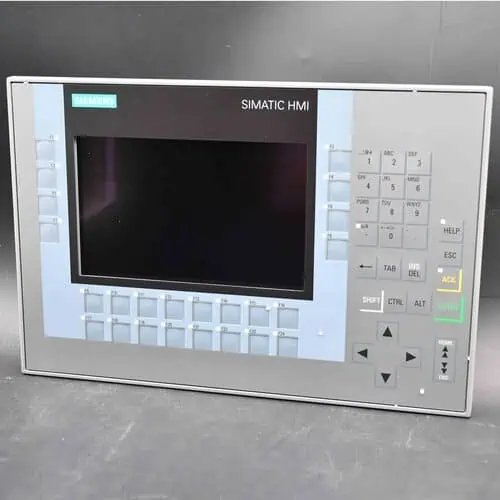
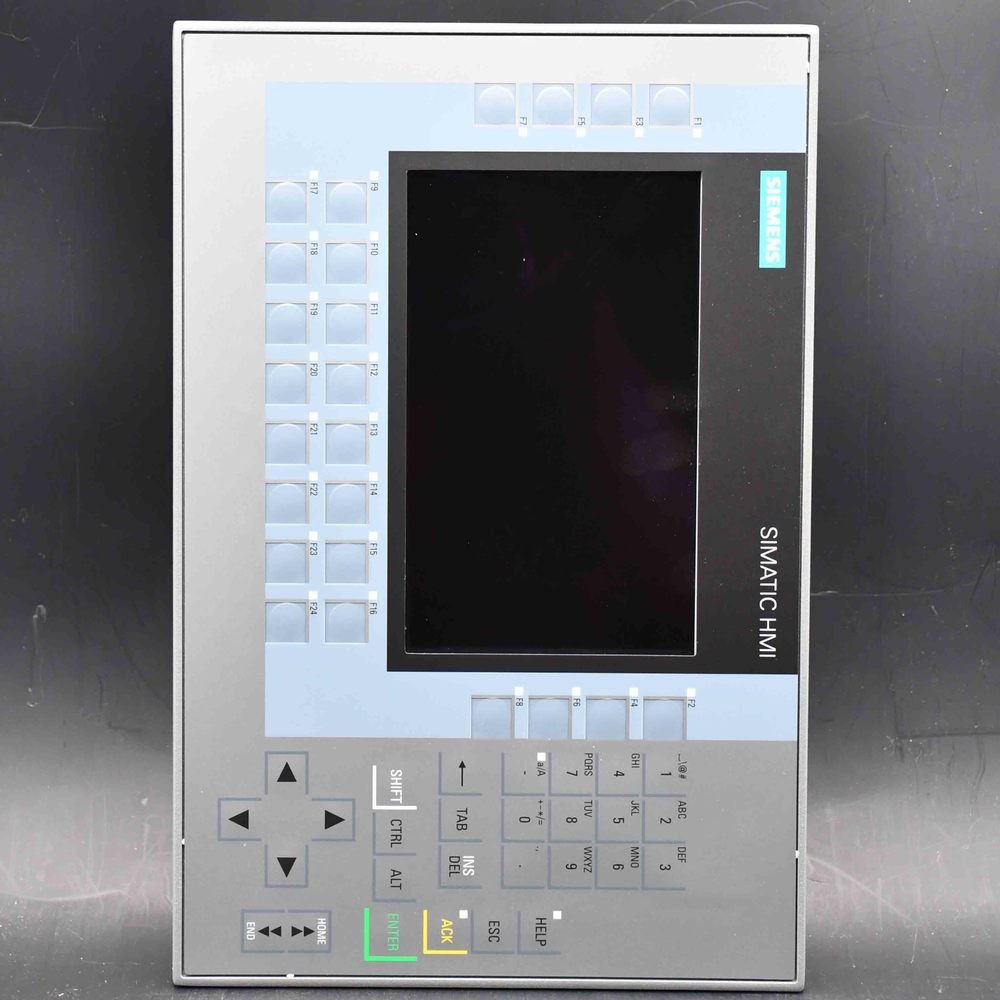
The Siemens SIMATIC HMI KP1200 Comfort (6AV2124-1MC01-0AX0) is a 12-inch widescreen TFT Comfort Panel with key operation, no touchscreen — 16M colours, PROFINET + MPI/PROFIBUS DP, 12 MB, Windows CE 6.0. Configured with WinCC Comfort V11+; same cutout as TP1200 Comfort, direct swap.
| Manufacturer | Siemens (Original Brand) |
|---|---|
| Product Line | SIMATIC HMI KP1200 Comfort — Comfort Panel, key version (12" widescreen TFT, key operation, PROFINET + MPI/PROFIBUS DP) |
| Condition | Original factory sealed panel (pedestal / supporting foot sold separately) |
| What's Included | Original factory sealed panel |
| Lead Time | In stock — ships within 48h via DHL, 3–7 days worldwide |
| Availability | In stock — quote for qty |
The SIMATIC HMI KP1200 Comfort (order number 6AV2124-1MC01-0AX0) is the 12-inch member of the standard Comfort range built around physical keys rather than a touch surface — a widescreen read-out plus thirty-four lit function keys and a full alphanumeric keypad, with no glass to break. Siemens placed it into phase-out at the end of January 2026, so it now serves mainly as a like-for-like replacement and spare-part panel rather than a fresh-design choice.
| Brand / Family | Siemens — SIMATIC HMI Comfort Panels, standard devices |
|---|---|
| Order Number | 6AV2124-1MC01-0AX0 |
| Operation | Key operation only — 34 function keys with LEDs, no touch screen |
| Display | 12.1-inch widescreen TFT, 1280 × 800 px, 16.7 million colors |
| Memory / Engineering | 12 MB configuration memory, Windows CE 6.0, WinCC Comfort V11 |
| Communication | PROFINET (integrated 2-port switch), MPI/PROFIBUS DP, 2 × USB 2.0, 2 × SD |
| Protection / Mounting | IP65 front, IP20 rear; flush cutout 434 × 269 mm; landscape only |
| Lifecycle | PM400 — phase-out since 31 January 2026; successor MTP1200 (6AV2128-3MB06-0AX1) |
| Availability | On request — condition and quantity confirmed per order |
Some stations are better run by buttons than by a screen. When operators wear gloves, work a panel that gets wet or oily, or simply hit the same few controls every cycle, a membrane keypad with thirty-four lit keys is the more dependable interface. The KP1200 carries a 12.1-inch message display for text, status and alarms, and leaves the actuation to keys whose LEDs double as indicators. Where a touch front would demand a bare finger and an intact surface, this panel keeps working through the conditions a real floor produces — and the F-keys can be wired as DP direct keys and LEDs, so the controller sees a press as an input and a lamp as an output without HMI scripting.
The order number still draws three buyers: replacing a failed unit whose cutout, project and TIA device already match, so the machine restarts without mechanical rework; holding a spare for a plant that runs several, because a stopped line costs more than a panel on a shelf; and shipping a like-for-like unit with an existing machine order. The 12-inch size carries hazardous-area and marine approvals, so it fits cells and vessels where a plain panel would not be accepted, and it gives a wider screen than the 9-inch key panel for alarm banners and faceplates.
For a new project the straight answer is the MTP1200 below; for the touch version of the same 12-inch size, the TP1200 Comfort is the sibling with a glass front. The KP1200 is the choice when you deliberately keep the screen as a read-out and let the keys do the work.
| Item | Specification |
|---|---|
| Display | 12.1-inch widescreen TFT; 1280 × 800 px; display area 261.1 × 163.2 mm; 16,777,216 colors; LED backlight dimmable 0–100%, MTBF 80,000 h at 25 °C |
| Operation | Key operation only — no touch screen; 34 function keys with LEDs; system keys; numeric and alphanumeric keypad |
| Mounting | Flush cutout 434 × 269 mm; front 454 × 289 mm; mounting depth 65 mm; landscape only, portrait not permitted; max inclination 35° without external ventilation |
| Interfaces | 2 × Industrial Ethernet PROFINET (integrated 2-port switch); 1 × RS-422/485 for MPI/PROFIBUS DP; 2 × USB 2.0; 2 × SD card slots |
| Processor / memory | X86 platform; 12 MB configuration memory; hardware clock retentive typically 6 weeks |
| Operating system | Windows CE 6.0 |
| Supply | 24 V DC, permissible 19.2 – 28.8 V DC; rated current 0.85 A; typical power 20 W; inrush I²t 0.5 A²s |
| Protection | IP65 at the front, IP20 at the rear; NEMA 4 / 4X at the front only; aluminium front bezel |
| Ambient temperature | 0 °C to +50 °C vertical; +40 °C at maximum inclination; transport/storage −20 °C to +60 °C |
| Engineering software | WinCC Comfort V11 (TIA Portal) or a later compatible version; project stored on SD card or the internal memory |
| Weight | 5.660 kg as shipped, packaging 41.0 × 53.0 × 18.0 cm |
| Approvals | CE, cULus, RCM, KC, EAC; ATEX Zone 2/22 and IECEx Zone 2/22; cULus Class I Zone 2 Div 2, FM Class I Div 2; marine approvals GL, ABS, BV, DNV, LRS, NK — per the unit nameplate and certificate |
Data per the Siemens product documentation and Industry Mall entry. The cutout, front dimensions and depth are from the mounting instructions — cut the enclosure only after the current data sheet is checked, because plate thickness and flatness decide whether the front seal actually seals.
A lit function key shows machine state and accepts a press in the same place. Operators learn the position of the thirty-four keys by feel, so a glance-and-press works in low light or behind a guard, and a key that clicks is a confirmed action in a way a target on glass is not. Better still, the F-keys can be declared as DP direct keys and DP direct LEDs, so a press appears at the PLC as an input bit and a lamp as an output bit — no HMI tag, no script, and a shorter, more auditable path for acknowledge and emergency functions.
In a Zone 2/22 hazardous area or on a classed vessel, the approvals on the nameplate decide whether a panel may be installed at all. The KP1200 carries ATEX/IECEx, Division 2 and marine type approvals, so the keypad is not just a preference but a specification requirement — and a touch-only successor would have to be checked against the same certificate before it could take the panel’s place.
There is no glass to crack, no surface that smears or shatters, and nothing that floods when a hose passes too close from the front face. The trade is density: a key panel does not show a full schematic or a video, and at 5.660 kg and 20 W it asks more behind the cutout than the 4-inch model — but it fits doors, pendant arms and panels where a 15-inch device would never go, while carrying the hazardous-area and marine ratings the smaller key panels also hold.
| Characteristic | KP1200 Comfort — this page | TP1200 Comfort (0MC01) |
|---|---|---|
| Operation | Keys only — 34 function keys with LEDs | Resistive touch screen, no keys |
| Screen | 12.1 in, 1280 × 800 px, for text and status | 12.1 in, 1280 × 800 px, for touch navigation and entry |
| Best when | Gloves, oil, fixed control points, hazardous areas | On-screen navigation, denser visualization |
| Memory / OS | 12 MB, Windows CE 6.0 | 12 MB, Windows CE 6.0 |
| Engineering | WinCC Comfort V11 | WinCC Comfort V11 |
| Envelope | Cutout 434 × 269 mm, 5.660 kg | Different form factor — verify before reusing an opening |
The two are different device types in the same 12-inch Comfort family, not a shared housing — the KP1200 is the larger of the two, and a TP1200 archive will not download unchanged onto a KP1200. Choose the key-only device when the keys do the work; choose the TP1200 when operators also tap through screens.
Four things decide whether the machine restarts on the same shift: cutout, depth behind the door, 24 V supply, and the project. With a known-good project on an SD card, a replacement needs no laptop at the machine — insert the card and load. Without one, an engineering seat has to open, recompile and download, so put that resource next to the electrician.
Unlike the 4-inch Comfort, the 12-inch size has a same-size Unified successor: the 6AV2128-3MB06-0AX1, the MTP1200 Unified Comfort — a capacitive, multi-touch panel at 1280 × 800 with WinCC Unified Comfort engineering. Because it has no keys, a station that depended on the thirty-four buttons has to regain them another way: Siemens provides the KP8 (eight-button) and KP32 (thirty-two-button) key modules on PROFINET, which restore a key surface beside the new touch panel.
The platform moves from Windows CE 6.0 to the Linux-based Unified system, the engineering tool moves from WinCC Comfort V11 to WinCC Unified Comfort, and the device type in the project changes. Screens do not port one to one, so the upgrade is a project with a schedule, not a download. Note also that the MTP1200 keeps the 12-inch class but is a different cutout from the KP1200, so the opening has to be rechecked. Treat the keypad decision as part of the migration plan, not an afterthought.
| At replacement time | Same type — 6AV2124-1MC01-0AX0 | Successor — MTP1200 (6AV2128-3MB06-0AX1) |
|---|---|---|
| Operation | 34 function keys, no touch | Capacitive multi-touch, no keys |
| Resolution | 1280 × 800 px | 1280 × 800 px |
| Keys retained | Built in | Via KP8 / KP32 key module on PROFINET |
| Operating system | Windows CE 6.0 | Linux-based Unified platform |
| Engineering | WinCC Comfort V11 | WinCC Unified Comfort |
| Project effort | Restore and recompile | Rebuild in WinCC Unified |
Successor assignment and the KP8/KP32 option follow the Siemens status-change notice for the 12-inch Comfort devices. Confirm the exact successor number, the cutout difference and the key-module fit against the current Siemens catalogue before ordering — the panel and the key module are separate order numbers.
The panel couples to SIMATIC S7-1200, S7-1500 and S7-300/400 over PROFINET or MPI/PROFIBUS DP, with Modbus TCP/IP and EtherNet/IP for third-party controllers. The two PROFINET ports form an integrated switch, so a line or ring topology connects without an external switch. The 9-inch KP900 Comfort is the smaller key sibling, the TP1200 Comfort is the touch end of this 12-inch size, the 15-inch KP1500 Comfort is the next key panel up, and the TP1500 Comfort PRO range is the one whose rear is also sealed for washdown or outdoor cells.
PM400, phase-out announced on 31 January 2026. New parts remain orderable until product cancellation, expected at the end of 2027, after which the Siemens spare-parts process applies. Availability now comes from channel stock, confirmed per order rather than taken from a catalogue status.
The 6AV2128-3MB06-0AX1, MTP1200 Unified Comfort: a 12-inch touch panel at 1280 × 800, configured in WinCC Unified Comfort. Because it has no keys, a station that needs physical buttons adds a KP8 or KP32 key module on PROFINET. The 12-inch size keeps a same-size successor.
No. It is key operation only — thirty-four function keys with LEDs, plus a numeric and an alphanumeric keypad, and no glass surface. For a 12-inch device with a touch layer, see the TP1200 Comfort (0MC01).
Yes. The F1…Fx keys can be set as DP direct keys (S7 input periphery) and the F1…Fx LEDs as DP direct LEDs (S7 output periphery), so a press or a lamp appears at the controller without HMI scripting. The keypad still needs the WinCC Comfort project for labels and assignment.
The KP1200 (this page) is keys only; the TP1200 (0MC01) is a resistive touch panel. They share the 12-inch Comfort platform and software, but they are different device types and different cutouts, so a project does not move between them unchanged.
WinCC Comfort V11 in TIA Portal, or a later compatible version, on 12 MB of configuration memory. WinCC Basic and WinCC Unified do not apply to this device.
For a key panel it is: the screen carries message text, status, alarms and button labels, which is the job. It is not meant for dense graphics or video, and the resolution is a deliberate fit for a control-point station, not a shortcoming.
No. Landscape is the only permitted orientation, with a maximum inclination of 35° without external ventilation (and a 0–40 °C limit at that tilt). If a narrow vertical door needs a key panel, the orientation and the cooling have to be decided together before the opening is cut.
Yes. The KP1200 carries two PROFINET ports with an integrated switch, so a line or ring topology connects without an external switch in the cabinet. The RS-422/485 port is the path into older MPI or PROFIBUS DP networks.
It carries ATEX and IECEx Zone 2/22, cULus Class I Zone 2 Div 2 and FM Class I Div 2, plus marine approvals (GL, ABS, BV, DNV, LRS, NK). The rating that applies is the one on the unit’s nameplate and covered by its certificate, so check that plate for the specific installation.
The panel occupies 65 mm behind the door, and the mounting instructions also require clearance behind the housing for connectors and ventilation. Add the bend radius of the PROFINET and MPI/DP cables before sizing the cutout depth.
No. The two are different device types, and although both are 12-inch they use different cutouts, so the opening and the project both have to change. A project has to be rebuilt for this device, not re-targeted.
Siemens stopped actively marketing the type on 31 January 2026 and will cancel it around the end of 2027, after which it follows the spare-parts process. New, new-surplus or refurbished units come from channel stock and are confirmed per order with condition stated on the quote.
Genuine Siemens hardware, sourced through Siemens-authorized distribution partners, condition stated on every quote; CAN Electric is an independent channel trader, not Siemens and not a factory-authorized distributor. Send order number, quantity, condition, delivery country and old nameplate details to sales@can-electric.com for USD pricing and DHL lead time.
6AV2124-0QC24-0AX0SIMATIC HMI Comfort Panel PRO● On Request
6AV2124-0QC24-0BX0SIMATIC HMI Comfort Panel PRO● On Request
6AV2124-0QC24-1AX0SIMATIC HMI Comfort Panel PRO● On Request
6AV2124-0UC02-0AX1SIMATIC HMI Comfort Panel● On Request
6AV2124-0UC24-0AX0SIMATIC HMI Comfort Panel PRO● On Request
6AV2124-0UC24-0BX0SIMATIC HMI Comfort Panel PRO● On Request
6AV2124-0UC24-1AX0SIMATIC HMI Comfort Panel PRO● On Request
6AV2124-0XC02-0AX0SIMATIC HMI Comfort Panel● On Request
6AV2124-0XC02-0AX1SIMATIC HMI Comfort Panel● On Request
6AV2124-0XC24-0AX0SIMATIC HMI Comfort Panel PRO● On Request
6AV2124-0XC24-0BX0SIMATIC HMI Comfort Panel PRO● On Request
6AV2124-0XC24-1AX0SIMATIC HMI Comfort Panel PRO● On Request
6AV2124-1DC01-0AX0SIMATIC HMI Comfort Panel● On Request
6AV2124-1GC01-0AX0SIMATIC HMI Comfort Panel● On Request
6AV2124-1JC01-0AX0SIMATIC HMI Comfort Panel● On Request
6AV2124-1QC02-0AX1SIMATIC HMI Comfort Panel● On Request
6AV2124-2DC01-0AX0SIMATIC HMI Comfort Panel● On Request
6ES7511-1AL03-0AB0SIMATIC S7-1500 CPU 1511-1 PN (station, Profinet)● On Request
CAN Electric is an independent channel trader. Genuine Siemens products are sourced through Siemens-authorized partners — we are not Siemens itself, and condition and delivery are confirmed on each quote. Lifecycle statements follow the Siemens product status at the time of writing.
We will contact you within 1 working day, please pay attention to the email with the suffix “allen@can-electric.com”.